
Enterprise & Team
MuleRun Team and Enterprise are the multi-person editions of Super Agent. They keep everything from the personal plans and add a management layer: members, seats, shared Credits, permissions, shared content, and unified billing.
Enterprise has its own Admin Console, integrated with the Super Agent main site — one account sees resources on both sides.
Who It's For
- Teams that need to capture knowledge, collaborate on files, and reach customers across channels.
- Organizations that want centralized Credits and permissions.
- Companies bringing enterprise-grade AI agents into day-to-day operations.
Team Plan Basics
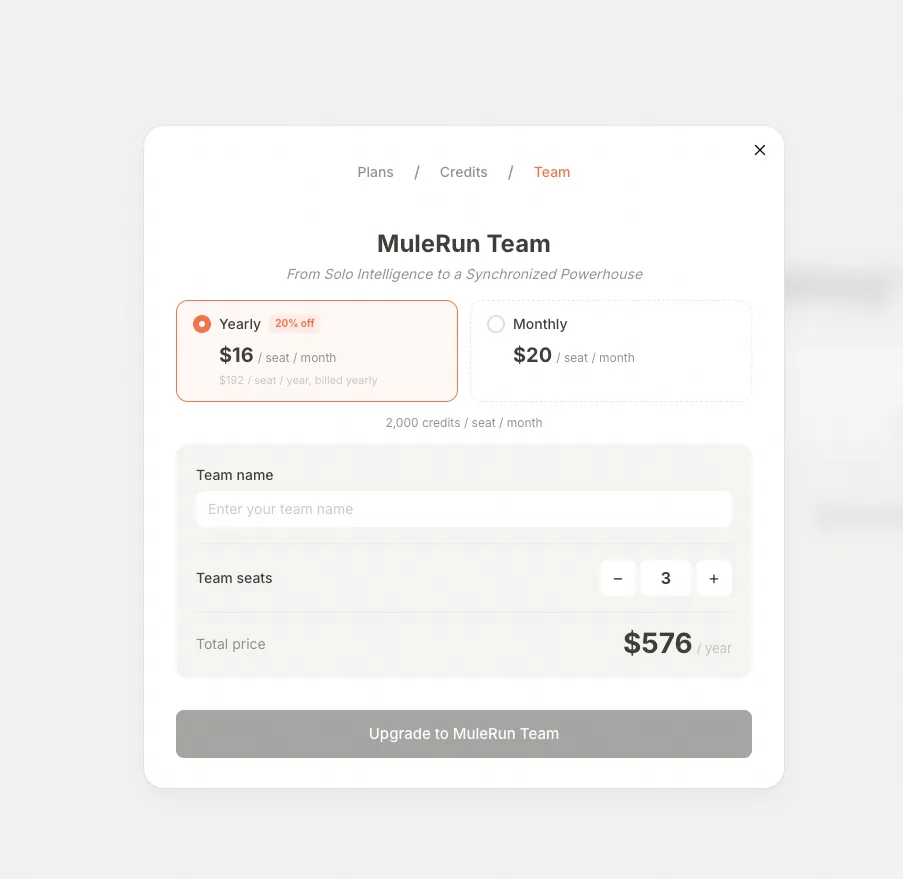
- Pricing: $20 per seat / month, or $192 per seat / year. A Team needs a minimum of 3 seats, and gets access to all paid features.
Subscribing via the Alibaba Cloud Marketplace
Log in to your Alibaba Cloud account and visit your My Services page.
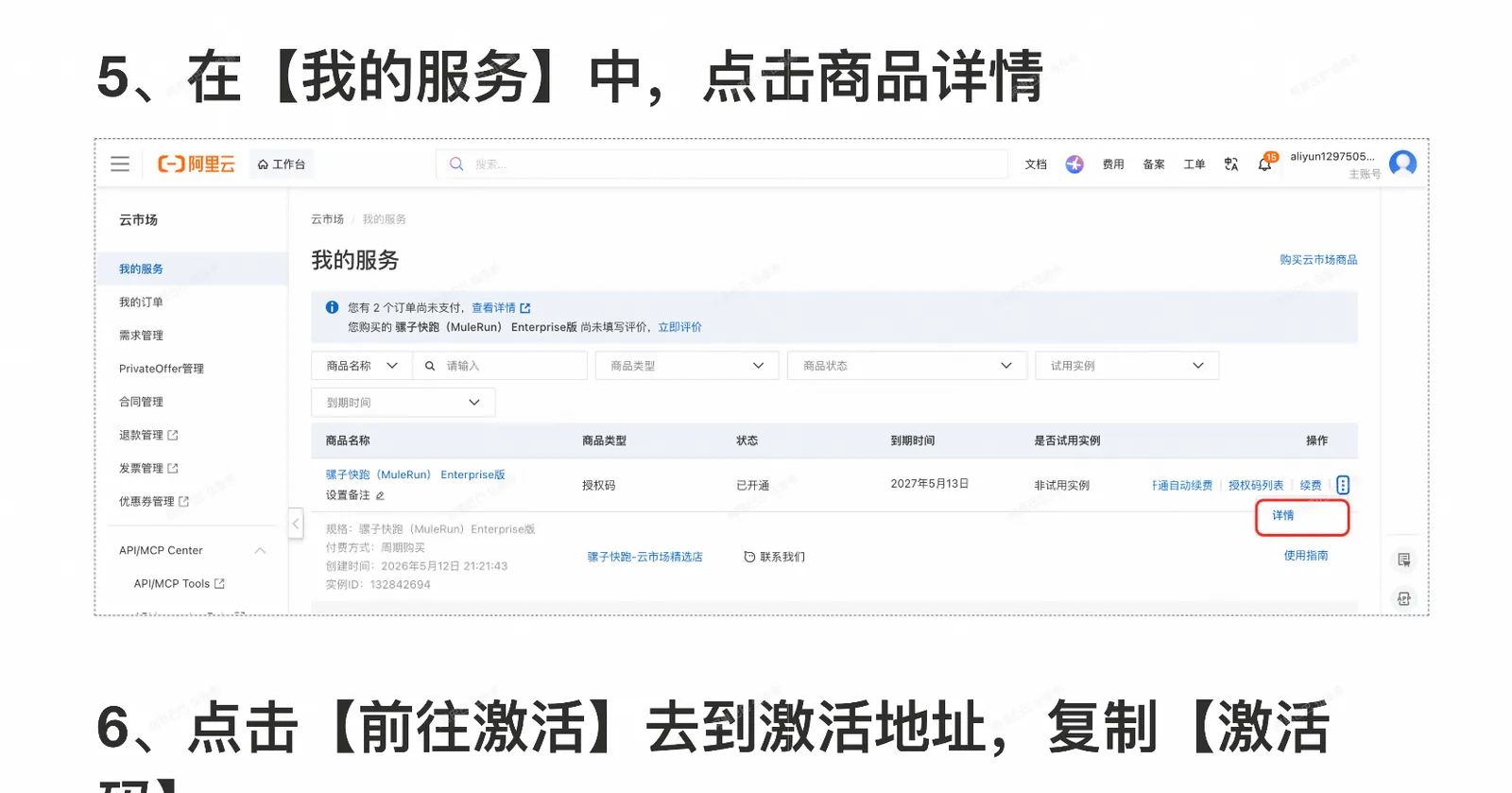
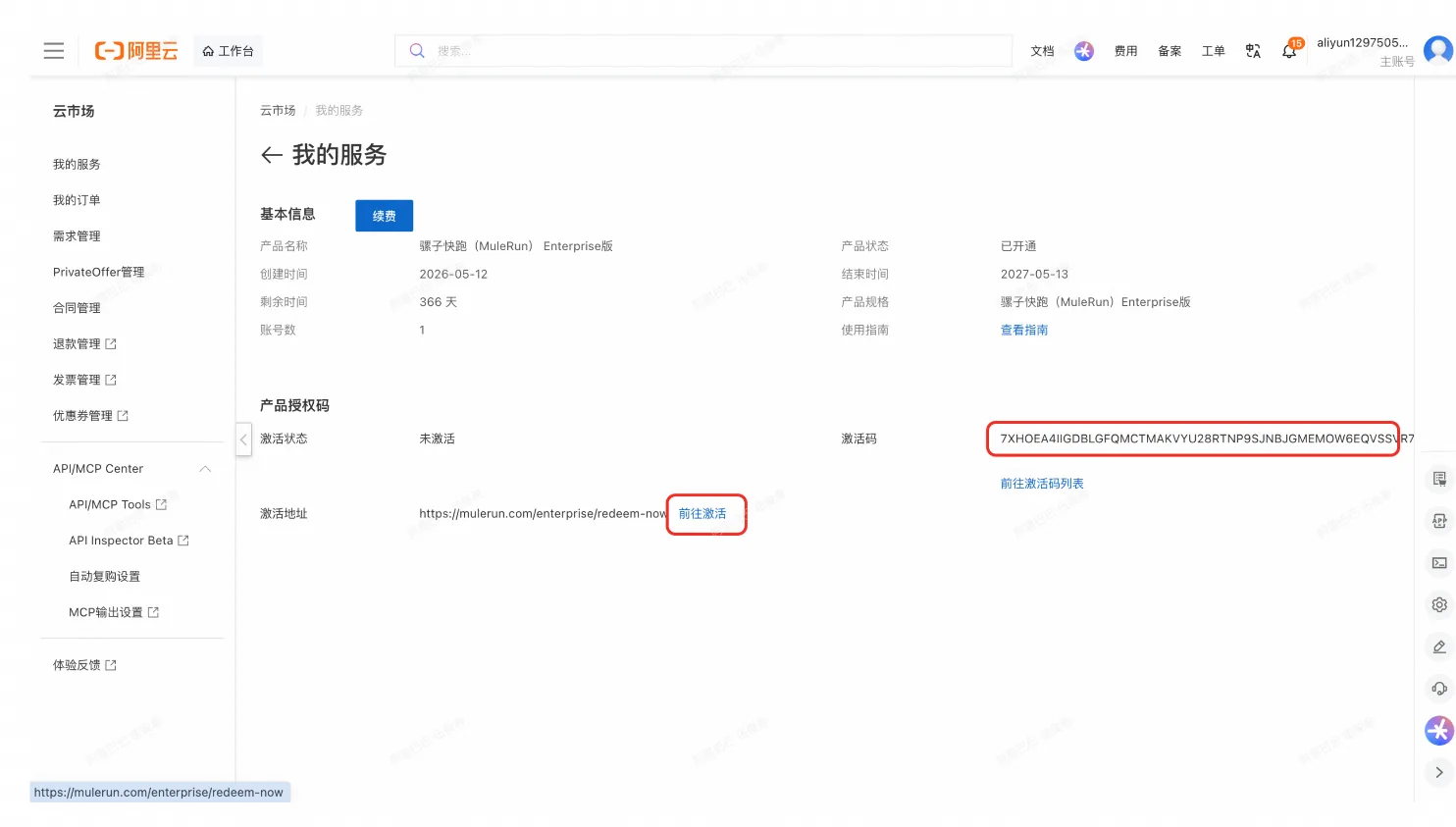
Enter the activation code and provide the administrator email address. Click the invitation link in the confirmation email and follow the prompts. If that email address already has a MuleRun personal account, you go directly to the Admin Console; otherwise register a personal account first.
Subscribing via the Website
- Go to mulerun.com and log in (register first if needed).
- Click the Credits area or Upgrade.
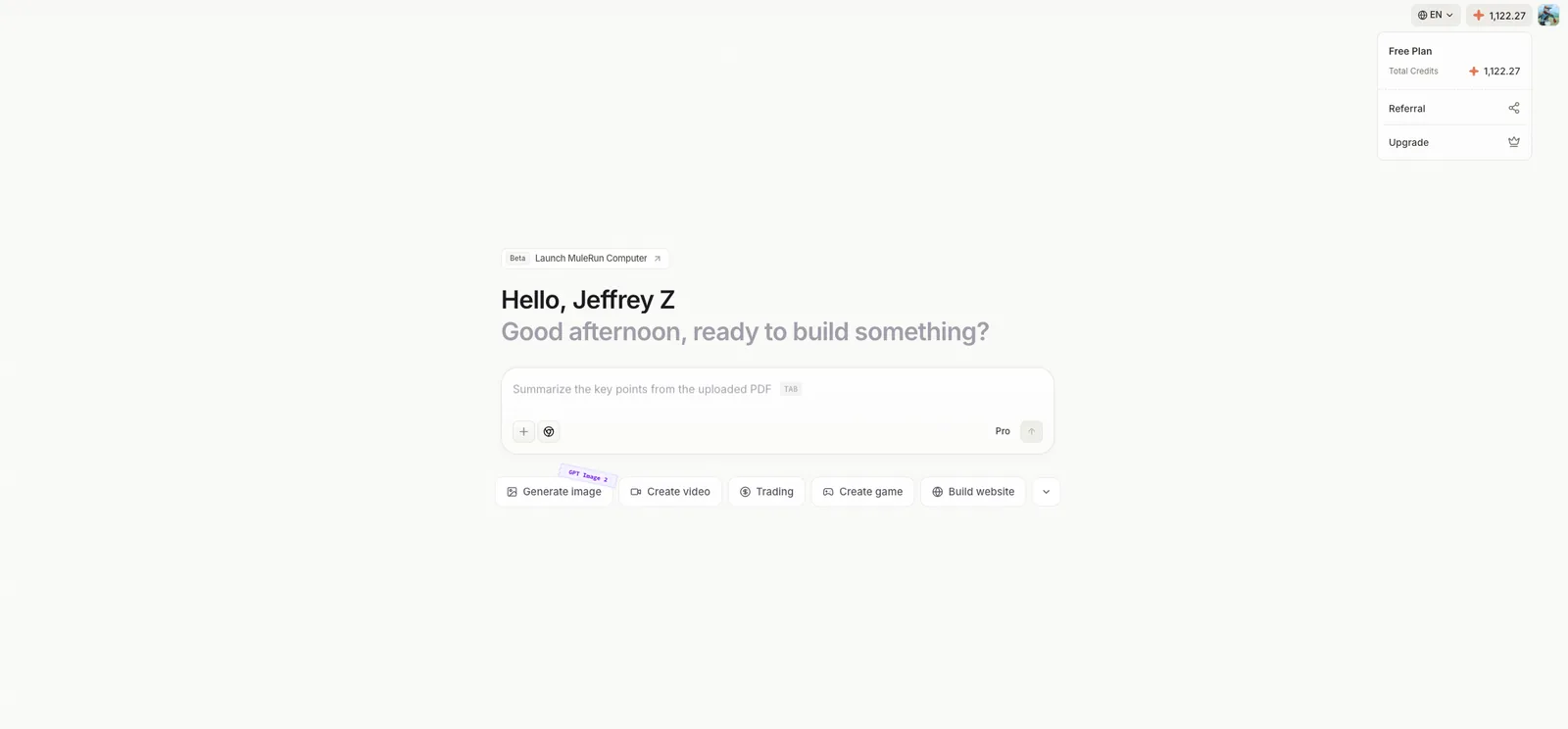
- In the dialog, choose Team, fill in the purchase details, and complete payment.
After payment, you are redirected automatically to the Admin Console.
Members
Role model — three roles, two layers:
- Super Admin — org level. Manages all teams and members, sets org-wide Credits quota, and is the only one who can grant or revoke Admin and Super Admin roles. Orthogonal to team-level roles — being Super Admin does not consume a team-management slot.
- Team Admin — team level. Invites, freezes, and removes members of their own team, and sets per-member quotas within that team.
- Team Member — uses Agents, configures their own Connectors, and creates their own Knowledge.
Inviting members:
Click your avatar in the top-right corner to open the Admin Console.
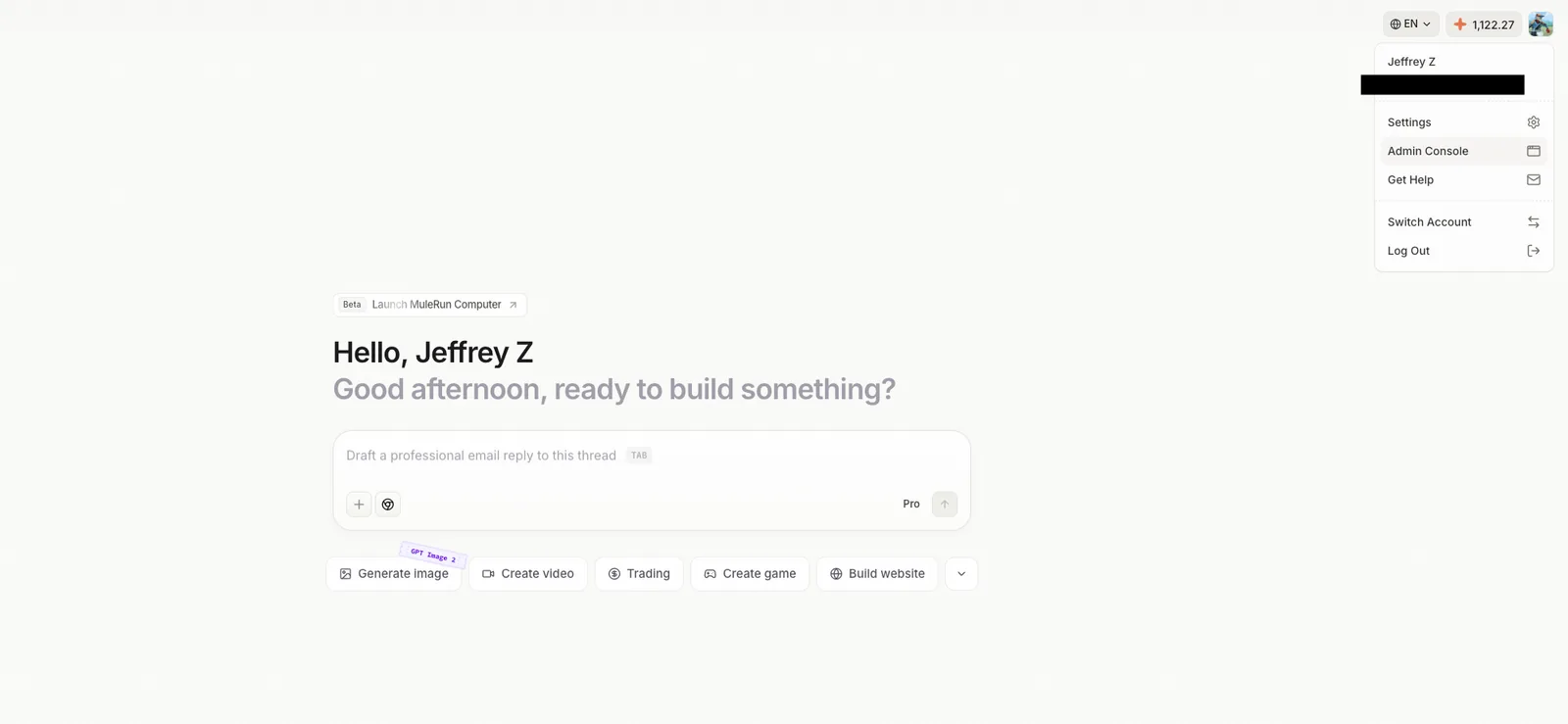
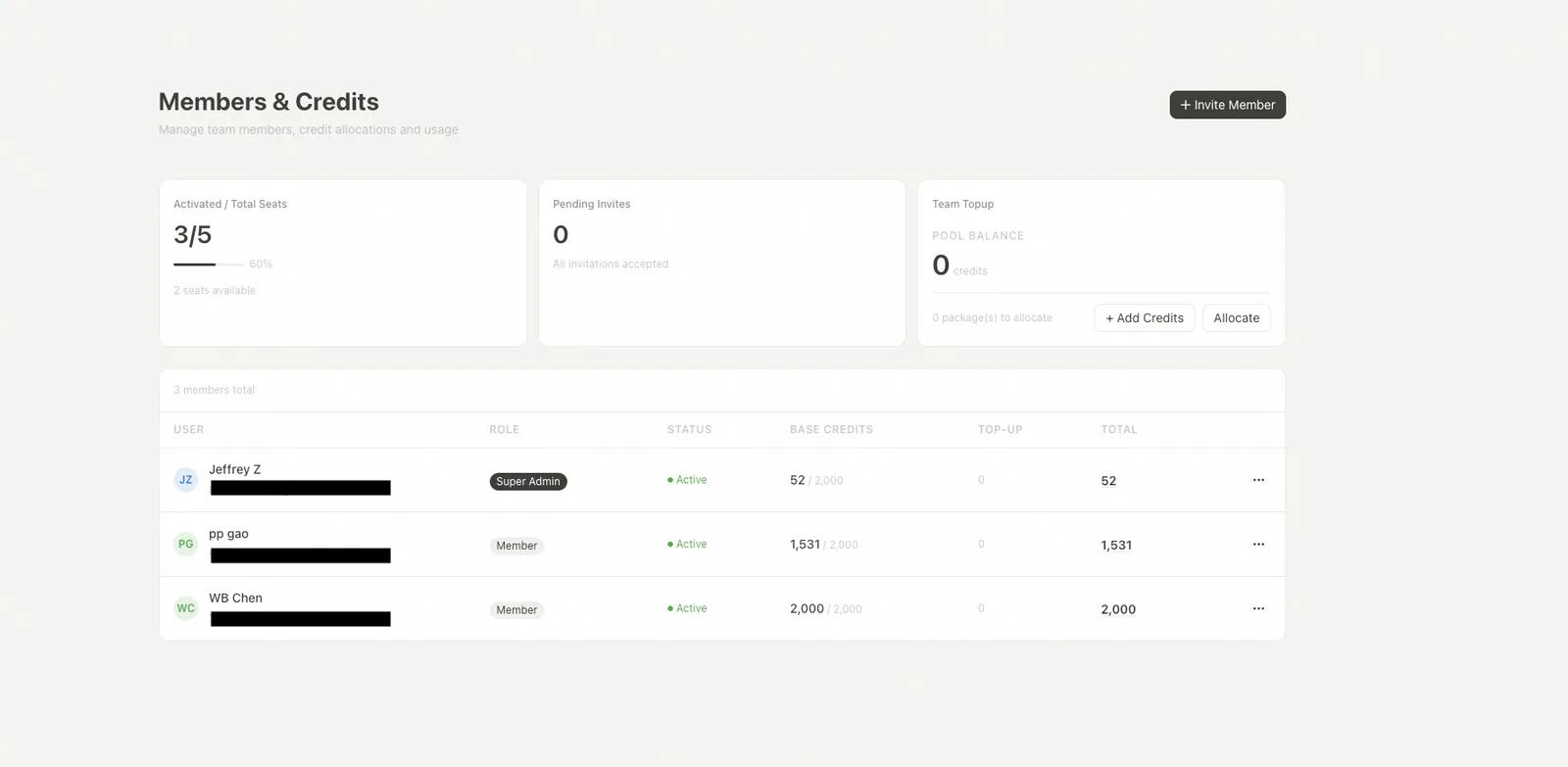
- Go to Admin Console → Members & Credits, click Invite Member, and enter up to 10 email addresses at once.
- Pick the role (Member or Admin — only a Super Admin can invite Admins).
- The invitation link is valid for 7 days; Resend has a 60-second cooldown; Revoke invalidates the link immediately.
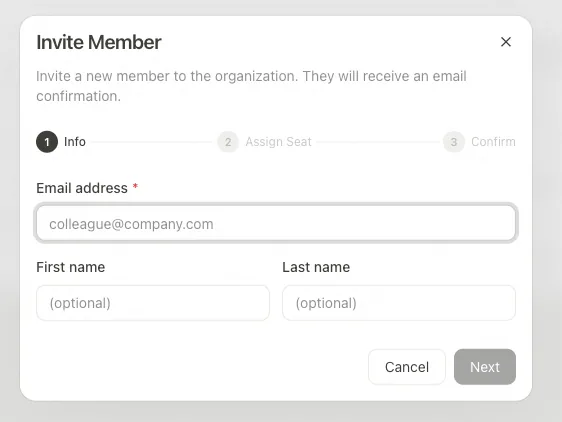
Enter the email addresses in the invitation dialog.
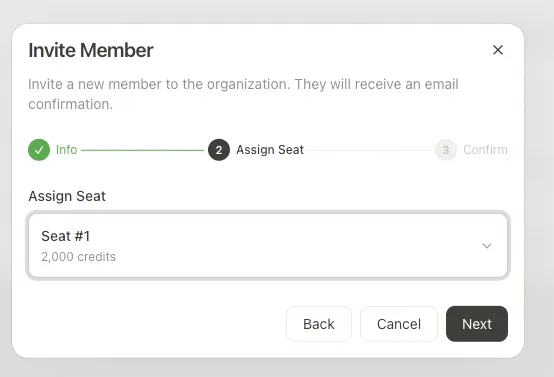
Select the seat or role for each invitee.
Member lifecycle states:
- Pending — invitation sent, not yet accepted.
- Active — joined the org and using it normally.
- Frozen — login and all access suspended, but seat, balance, and config kept.
- Removed — seat released, login disabled.
Freeze vs Remove:
- Freeze is reversible: all access stops, but the seat, Credits balance, and personal configuration are kept; click Unfreeze to restore.
- Remove is terminal: the seat is released immediately and login is disabled; re-inviting the same email reuses the same identity (history is preserved). A per-cycle remove cap prevents seat-churn abuse.
Role-change rules:
- Only a Super Admin can grant or revoke Admin / Super Admin.
- Nobody can change their own role.
- A Super Admin can only be modified by another Super Admin; to freeze or remove one, the Super Admin role must be revoked first.
Accepting invitations: the international version uses name fields to complete sign-up; for accounts using phone-based sign-in, the invitee completes registration with phone number + SMS verification.
Teams
- Group members into teams (departments) inside an organization.
- Each team has its own member list.
- Per-team permissions, usage caps, and billing are supported.
Credits Management
Multi-person plans use two kinds of Credits:
- Base Credits — 2,000 per seat, refreshed every subscription cycle (your subscription date, not the calendar 1st), valid only within the cycle, and consumed first. On Enterprise they are shared across all members; on Team each seat keeps its own.
- Top-up Credits — extra Credits bought by the admin at $1 = 100 Credits, consumed after Base Credits run out. On Team they are valid for 1 year and the admin allocates them to specific seats (one purchased package is allocated in full at a time); on Enterprise they are shared by everyone and last until the end of that year's subscription cycle. Enterprise buys extra Credits through the Cloud Marketplace.
Usage caps (Quota) — on Enterprise, admins set per-cycle usage limits that reset each month, following the hierarchy member ≤ department ≤ organization:
- A Super Admin sets the organization-wide limit at
adminconsole/credits(edit Organization Quota), and can also cap departments. - A Super Admin / Admin caps an individual member's monthly usage on the same page.
Admins manage everything from the Admin Console: top up, allocate, set caps, and drill into usage. For detailed step-by-step instructions on purchasing Top-up Credits, setting quotas, and allocating Credits on Team, see Credits Rules.
Shared Resources
Knowledge (org governance)
Members save reusable task templates as Knowledge. Admins see all knowledge across the org under three tabs — Published / Unpublished / Deleted — and can Publish (make it org-wide visible), Unpublish (revert it to creator-only), or Delete (soft-delete, irreversible, kept for audit). Admins cannot edit knowledge content — that right belongs only to the creator. Governance actions affect new sessions only; running sessions are unaffected. See Knowledge for usage details.
Skills (custom skill packs)
Admins upload .zip skill packs (max 50 MB) in Admin Console → Skills. Each Skill has one editable Draft plus immutable v1, v2, … snapshots created by clicking Publish. A Skill is enabled by adding it to an Agent's skill list — there is no global toggle. Skills can declare third-party integration requirements (by Provider or specific Integration), marked required or optional; required deps must have a matching Active Integration before the Skill can be enabled. Two kinds: Built-in (MuleRun official, visible to all orgs) and Organization (private to your enterprise). Deletes are a two-step flow (a usage report is shown before force-delete).
Drive
Shared organization file storage. Members can save files into the shared Drive; per-member Drive usage is visible in the member list (an admin-only column, opt-in toggle). Quotas follow the org / Team Credits model — see Credits Management above.
Connectors (Integration vs Connector)
Two layers: Integration is an org-level authorization template the admin creates (e.g. "our company's Salesforce"); Connector is the personal connection a member completes (OAuth) to bind their own account to that Integration.
- Admins manage Integrations in Admin Console → Integrations: pick a Provider (Salesforce, GitHub, DingTalk, Feishu, Lark, WeCom, Microsoft Teams, Slack, SharePoint Online, Tableau, SAP Concur — list growing), run Test Connect, and once Active, members can bind to it.
- Members manage their own Connectors in MuleChat → Connectors: click Connect to authorize, optionally scope the connection to a specific Skill only; Disconnect is a soft disconnect; Revoke also revokes the third-party authorization.
- Supported auth methods: OAuth2 / OAuth2 Client Credentials / OAuth1 / Basic Auth / API Key / JWT.
- Identity inheritance: when an Agent calls a third-party service through a Connector, it acts under the connecting member's authorization — it only sees what that member sees. No extra access is granted beyond the member's own permissions.
Admins: see Enterprise Integrations Setup for step-by-step, per-provider configuration (creating the OAuth app, callback URLs, Test Connect, and enabling the matching Skill).
Subscription & Billing
- Enterprise invoices and billing.
- Organization-level subscription management.
Data Security
- Data passing through LLM calls is not used for training.
- Enterprise content cannot be shared outside the organization — sharing stays inside the org.
- Admins can fine-tune content visibility.
How Do I Get Started?
Subscribe to Team directly from the pricing page, or use the Contact Sales entry there (or reach out through support) for Enterprise and multi-department needs.